
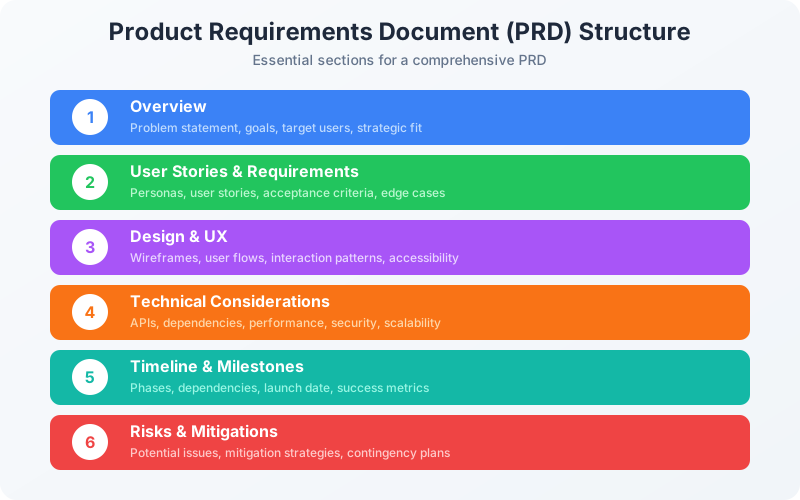
Product Requirements Document (PRD) Structure
A comprehensive PRD includes these 6 essential sections to ensure alignment across engineering, design, and stakeholders.
Overview
Problem statement, goals, success metrics
User Stories
Who are the users and what do they need?
Requirements
Functional and non-functional specs
Design
Wireframes, user flows, technical approach
Timeline
Milestones, dependencies, launch date
Risks & Mitigations
What could go wrong and how to prevent it
What is a PRD and Why Does It Matter?
A Product Requirements Document (PRD) is a document that defines what a product or feature should do, why it matters, and how success will be measured. It serves as the single source of truth for product development, aligning stakeholders on the problem being solved, the target users, and success criteria. A well-written PRD prevents scope creep and keeps teams focused throughout development.
At companies like Google, Amazon, and Meta, PRDs are essential artifacts that bridge strategy and execution. They transform product vision into actionable requirements that engineering teams can implement. Without a clear PRD, teams often build the wrong thing, miss edge cases, or lose sight of the original goals.
This guide provides a comprehensive PRD template along with best practices, real examples, and tips for writing PRDs that actually get read and used by your team.
PRD Template Structure
A complete PRD contains six core sections. Each section serves a specific purpose and audience. Here's what to include in each:
Overview
High-level summary of the feature and its strategic importance
Goals & Success Metrics
What success looks like and how we will measure it
User Stories & Requirements
Detailed requirements from the user perspective
Design & UX
Visual and interaction specifications
Technical Considerations
Technical context and constraints
Launch & Rollout
How the feature will be released
Complete PRD Template
Copy this template and customize it for your feature. Each section includes guidance on what to write.
PRD: [Feature Name]
Last updated: [Date] | Author: [Your Name] | Status: [Draft/Review/Approved]
1Overview
Executive Summary
One paragraph summary of the feature. What is it? Why are we building it? What's the expected impact?
Problem Statement
Describe the user problem or business opportunity. Include data that validates the problem exists and is worth solving.
Target Users
Who are we building this for? Be specific about user segments, personas, or cohorts.
Strategic Fit
How does this align with company/product strategy? Which OKRs does it support?
2Goals & Success Metrics
Primary Objective
The single most important outcome. What will be different if this succeeds?
Key Results
Measurable outcomes with specific targets. E.g., "Increase conversion rate from 2% to 4%" or "Reduce support tickets by 30%"
Guardrail Metrics
Metrics that should NOT decrease. E.g., "User retention should not drop below current baseline"
3User Stories & Requirements
User Stories
Format: As a [user type], I want to [action] so that [benefit]
Example: As a new user, I want to see a progress indicator during onboarding so that I know how many steps are left.
Functional Requirements
Specific, testable requirements. Number them for easy reference (FR-1, FR-2, etc.)
Non-Functional Requirements
Performance, security, accessibility, localization requirements
Out of Scope
Explicitly list what this PRD does NOT cover to prevent scope creep
4Design & User Experience
User Flows
Step-by-step user journey. Include happy path and key alternative paths.
Wireframes/Mockups
Link to Figma/design files. Include key screens with annotations.
Edge Cases
Error states, empty states, loading states, permission states
5Technical Considerations
Dependencies
Other teams, services, or features this depends on
API Requirements
New endpoints needed, data models, integration points
Performance Requirements
Load times, throughput, latency requirements
Security & Privacy
Data handling, authentication, compliance requirements
6Launch & Rollout Plan
Release Phases
Internal testing → Beta → Gradual rollout → GA
Feature Flags
How will the feature be gated? Rollout percentage plan.
Rollback Plan
How do we revert if something goes wrong?
Success Criteria for Each Phase
What metrics must be met before proceeding to next phase?
PRD Template (Copy-Ready Markdown)
A complete, copy-ready PRD template in Markdown format. Click the button to copy and paste into Notion, Confluence, or any Markdown editor.
Complete PRD Template
All 6 sections with tables, checklists, and examples
# PRD: [Feature Name]

| Field | Value |
|-------|-------|
| **Author** | [Your Name] |
| **Last Updated** | [Date] |
| **Status** | [Draft / In Review / Approved] |
| **Target Release** | [Quarter or Date] |
| **Stakeholders** | [List key stakeholders] |

---

## 1. Overview

### Executive Summary

[One paragraph summary: What is this feature? Why are we building it? What's the expected impact?]

### Problem Statement

[Describe the user problem or business opportunity. Include data that validates the problem exists and is worth solving.]

**Evidence:**
- [Data point 1: e.g., "40% of users abandon checkout at payment step"]
- [Data point 2: e.g., "NPS comments mention this issue 3x more than any other"]
- [Data point 3: e.g., "Competitors X and Y have solved this"]

### Target Users

| Persona | Description | % of User Base |
|---------|-------------|----------------|
| [Persona 1] | [Brief description] | [X%] |
| [Persona 2] | [Brief description] | [X%] |

### Strategic Fit

- **Company OKR:** [Which company objective does this support?]
- **Product Strategy:** [How does this fit into the product vision?]
- **Why Now:** [Why is this the right time to build this?]

---

## 2. Goals & Success Metrics

### Primary Objective

[The single most important outcome. What will be different if this succeeds?]

### Key Results

| Metric | Current | Target | Timeline |
|--------|---------|--------|----------|
| [Primary metric] | [Baseline] | [Goal] | [When] |
| [Secondary metric] | [Baseline] | [Goal] | [When] |
| [Tertiary metric] | [Baseline] | [Goal] | [When] |

### Guardrail Metrics

> Metrics that should NOT decrease as a result of this feature.

- [Metric 1]: Should not drop below [threshold]
- [Metric 2]: Should not drop below [threshold]

---

## 3. User Stories & Requirements

### User Stories

#### US-1: [Story Title]

**As a** [user type],
**I want** [capability]
**so that** [benefit].

**Acceptance Criteria:**
- [ ] Given [context], when [action], then [outcome]
- [ ] Given [context], when [action], then [outcome]

#### US-2: [Story Title]

**As a** [user type],
**I want** [capability]
**so that** [benefit].

**Acceptance Criteria:**
- [ ] Given [context], when [action], then [outcome]
- [ ] Given [context], when [action], then [outcome]

### Functional Requirements

| ID | Requirement | Priority | Notes |
|----|-------------|----------|-------|
| FR-1 | [Requirement description] | Must Have | [Notes] |
| FR-2 | [Requirement description] | Must Have | [Notes] |
| FR-3 | [Requirement description] | Should Have | [Notes] |
| FR-4 | [Requirement description] | Nice to Have | [Notes] |

### Non-Functional Requirements

- **Performance:** [e.g., Page load < 2s, API response < 200ms]
- **Security:** [e.g., Data encryption, authentication requirements]
- **Accessibility:** [e.g., WCAG 2.1 AA compliance]
- **Localization:** [e.g., Support for X languages]

### Out of Scope

> Explicitly listing what this PRD does NOT cover prevents scope creep.

- [Item 1]: Will be addressed in Phase 2
- [Item 2]: Separate initiative, see [link]
- [Item 3]: Not planned

---

## 4. Design & User Experience

### User Flow

```
[Start] → [Step 1] → [Step 2] → [Decision Point]
                                    ↓
                          [Path A] or [Path B]
                                    ↓
                               [End State]
```

### Wireframes / Mockups

- **Figma:** [Link to designs]
- **Prototype:** [Link to interactive prototype]

### Key Screens

1. **[Screen Name]:** [Brief description of what it shows]
2. **[Screen Name]:** [Brief description of what it shows]
3. **[Screen Name]:** [Brief description of what it shows]

### Edge Cases & States

| State | Behavior |
|-------|----------|
| Empty state | [What users see when there's no data] |
| Loading state | [Loading indicator behavior] |
| Error state | [Error message and recovery options] |
| Permission denied | [What unauthorized users see] |

---

## 5. Technical Considerations

### Dependencies

| Dependency | Owner | Status | Risk |
|------------|-------|--------|------|
| [Service/Team 1] | [Owner] | [Status] | [Risk level] |
| [Service/Team 2] | [Owner] | [Status] | [Risk level] |

### API Requirements

- **New Endpoints:**
  - `POST /api/[endpoint]` - [Description]
  - `GET /api/[endpoint]` - [Description]

- **Data Models:**
  - [Model name]: [Brief description of fields]

### Performance Requirements

- Page load time: < [X] seconds
- API response time: < [X] ms (p95)
- Concurrent users supported: [X]

### Security & Privacy

- [ ] Data classification: [Public / Internal / Confidential / Restricted]
- [ ] PII handling: [Describe how personal data is handled]
- [ ] Compliance: [GDPR, SOC 2, HIPAA, etc.]

---

## 6. Launch & Rollout Plan

### Release Phases

| Phase | Description | Audience | Success Criteria |
|-------|-------------|----------|------------------|
| 1. Internal | Internal testing | Employees | No P0/P1 bugs |
| 2. Beta | Limited release | [X%] of users | [Metric target] |
| 3. GA | Full release | All users | [Metric target] |

### Feature Flags

- Flag name: `[feature_flag_name]`
- Rollout plan: 1% → 10% → 50% → 100%

### Rollback Plan

**Trigger:** [What conditions would trigger a rollback?]

**Steps:**
1. [Step 1]
2. [Step 2]
3. [Step 3]

### Communication Plan

- [ ] Internal announcement: [Date]
- [ ] Customer communication: [Date]
- [ ] Documentation update: [Date]
- [ ] Support team training: [Date]

---

## Appendix

### Open Questions

| Question | Owner | Due Date | Status |
|----------|-------|----------|--------|
| [Question 1] | [Owner] | [Date] | [Open/Resolved] |
| [Question 2] | [Owner] | [Date] | [Open/Resolved] |

### References

- [Link to user research]
- [Link to competitive analysis]
- [Link to technical design doc]

### Changelog

| Date | Author | Changes |
|------|--------|---------|
| [Date] | [Name] | Initial draft |
| [Date] | [Name] | [What changed] |
PRD Examples
Here are abbreviated examples showing how real PRDs apply this template:
Example: User Onboarding Redesign
B2B SaaS Product
Problem
60% of new users drop off before completing setup. User research shows the 8-step onboarding is overwhelming, and users don't understand the value until step 6.
Goal
Increase onboarding completion rate from 40% to 70% within 60 days of launch.
Solution
Reduce onboarding to 4 essential steps, show product value by step 2, defer advanced setup to post-activation.
Example: Mobile Push Notifications
Consumer App
Problem
Day-7 retention is 15%, well below the 25% industry benchmark. Users forget about the app after initial download.
Goal
Increase D7 retention to 22% through personalized push notifications while maintaining uninstall rate below 5%.
Solution
Implement smart push notification system with user preference controls, optimal timing algorithm, and personalized content based on user behavior.
Example: API Rate Limiting Dashboard
Developer Platform
Problem
Developers hit rate limits unexpectedly, generating 200+ support tickets monthly. No visibility into current usage vs. limits.
Goal
Reduce rate-limit support tickets by 70% by giving developers self-serve visibility and proactive alerts.
Solution
Build real-time usage dashboard showing current usage, limits, and historical patterns. Add email alerts at 80% and 95% thresholds.
PRD Best Practices
Do This
- +Start with the problem, not the solution
- +Include specific, measurable success criteria
- +Get engineering input before finalizing
- +Explicitly list what's out of scope
- +Keep it updated as requirements evolve
Avoid This
- -Writing implementation details (that's engineering's job)
- -Vague goals like "improve user experience"
- -Skipping edge cases and error states
- -Writing a PRD after development starts
- -Making it so long no one reads it
Looking for PRD Tools?
Popular tools for writing and managing PRDs include Notion, Confluence, Coda, Productboard, and Aha!
See our full tool comparison in the Roadmap Template guideFrequently Asked Questions
What is a Product Requirements Document (PRD)?
A Product Requirements Document (PRD) is a document that defines the purpose, features, functionality, and behavior of a product or feature. It serves as the single source of truth for what the engineering team should build, aligning stakeholders on the problem being solved, the target users, and success criteria. PRDs typically include problem statements, goals, user stories, detailed requirements, design specifications, and success metrics.
Who writes the PRD?
Product Managers are typically responsible for writing and maintaining PRDs. However, the best PRDs are collaborative documents that incorporate input from engineering (technical feasibility), design (user experience), data science (metrics), and business stakeholders (strategy alignment). The PM owns the document but should gather feedback from cross-functional partners before finalizing.
How long should a PRD be?
PRD length varies based on feature complexity. A small feature might need 2-3 pages, while a major product initiative could require 10-15 pages. The key is to include enough detail for the team to build confidently without unnecessary padding. Focus on clarity over length. Many modern teams prefer shorter, living documents that evolve rather than lengthy static specs.
What is the difference between a PRD and a product spec?
The terms are often used interchangeably. Traditionally, a PRD focuses on "what" and "why" (requirements and rationale), while a product specification (spec) includes more technical "how" details. In practice, most modern PRDs combine both elements. Some companies use PRD for the initial requirements and spec for detailed implementation guidelines.
When should I write a PRD?
Write a PRD before starting development for any feature that requires cross-functional coordination, takes more than a few days to build, or has significant business impact. Skip PRDs for small bug fixes, minor copy changes, or well-understood improvements. The goal is alignment and documentation, so use judgment on when formality is needed.
Should PRDs include technical implementation details?
PRDs should focus on requirements and constraints, not implementation. Include technical context that affects the product (API limitations, performance requirements, security needs) but leave architecture and code decisions to engineering. Specify what the system should do, not how it should be built internally. Engineering designs should reference the PRD but live in separate technical design documents.
How do I handle PRD changes during development?
PRDs should be living documents. When requirements change, update the PRD, communicate changes to the team, and document the reason for the change. Use version history or a changelog section to track significant changes. Avoid scope creep by evaluating change requests against original goals. Major changes may warrant a new PRD or explicit scope revision with stakeholder agreement.
What tools do PMs use to write PRDs?
Popular PRD tools include Notion (most common at startups), Confluence (enterprise standard), Google Docs (collaborative editing), Coda, and specialized product management tools like Productboard or Aha!. The tool matters less than the content and process. Choose a tool your team already uses for documentation, supports collaboration, and allows easy sharing with stakeholders. For a detailed comparison of roadmap and product management tools, see our Roadmap Template guide.
Watch: PM Career Insights
About the Author

Aditi Chaturvedi
·Founder, Best PM JobsAditi is the founder of Best PM Jobs, helping product managers find their dream roles at top tech companies. With experience in product management and recruiting, she creates resources to help PMs level up their careers.